Never available again
View alternatives in the sidebar
View alternatives in the sidebar
Product number | 820815 | |
|---|---|---|
Manufacturer code | C18200 | |
Brand | Kurio | |
Warranty | 2 years | |
Processing of your defect | Carry-in warranty |
Tablet size | Medium-sized | |
|---|---|---|
Depth | 0,8 cm | |
Width | 26 cm | |
Height | 16 cm | |
Color | White | |
Material | Plastic |
Child mode available | ||
|---|---|---|
Children's tablet | ||
Samsung Enterprise Edition |
Screen quality | Mediocre | |
|---|---|---|
Screen size | 10 inches | |
Screen-to-body ratio | 69,22 % | |
Sharpness | WXGA | |
Resolution height | 800 pixels | |
Resolution width | 1280 pixels | |
Pixel density | 150 ppi | |
Brightness | 300 cd/m2 | |
HDR support | ||
Scratch resistant | ||
Panel type | IPS panel | |
Horizontal aspect ratio | 1280 | |
Vertical aspect ratio | 800 | |
Refresh rate | 60 Hz |
Built-in WiFi | ||
|---|---|---|
WiFi standards | Wireless B, Wireless G, Wireless N | |
Internet connection options | WiFi only | |
SIM card slot | ||
Bluetooth | ||
Headphone jack | ||
USB port | ||
Type of USB port | Micro USB-B (type: 2.0) | |
Lightning connector | ||
Suitable for Samsung DeX |
Year introduced | 2018 | |
|---|---|---|
Introduction month | August | |
Access to Google Play Store | ||
Operating system | Android | |
Android version when introduced | Android 8.1 Oreo | |
Expected frequency security updates | Each quarter | |
Expected date of last security update | August 2020 | |
Assessment remaining security updates | Mediocre | |
Review update policy | Mediocre |
Total storage capacity | 16 GB | |
|---|---|---|
Memory card reader | ||
Memory card | MicroSD | |
Expandable storage capacity up to | 32 GB | |
Internal RAM | 1 GB |
Speed class | Mediocre | |
|---|---|---|
Processor | MediaTek | |
Processor cores | Quad-Core (4) | |
Clock speed | 1,3 GHz | |
Turbo speed | 1,3 GHz |
Autofocus | ||
|---|---|---|
Front Camera | ||
Number of megapixels front camera | 2 MP | |
Second rear camera |
Battery/battery capacity | 4000 mAh | |
|---|---|---|
Suitable for fast charging |
Built-in speakers | ||
|---|---|---|
Sound reproduction | Mono | |
Number of speakers | 1 |
Accelerometer | ||
|---|---|---|
GPS sensor | ||
Light sensor | ||
Fingerprint identity sensor | ||
Facial recognition |
Water-resistant | ||
|---|---|---|
Shockproof |
anything for a smile
Tablet size | Medium-sized | |
|---|---|---|
Speed class | Mediocre | |
Screen quality | Mediocre | |
Total storage capacity | 16 GB | |
Internet connection options | WiFi only | |
Screen size | 10 inches | |
Operating system | Android | |
Internal RAM | 1 GB |
According to our tablet expert
Children play safely on this tablet, thanks to the special Kurio Genius parental controls.
The sturdy cover protects this tablet against damage from drops and bumps.
On the large 10 inch screen, children have plenty of space to play games and watch videos.
The battery doesn't last as long as average.
The Kurio Tab XL children's tablet is slower than regular tablets.
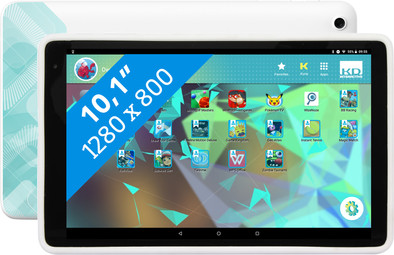
With the Kurio Tab XL, Kurio presents another tablet that has specially been designed for kids, but it's much larger than previous Kurio tablets. Kids won't miss a single detail from their favorite video or (child-friendly) game on the 10-inch screen. On top of that, the screen is safe for your child's eyes thanks to the integrated blue light filter. The Kurio Genius program allows you to keep an eye on what your children are doing and how long they're doing it, and you can easily set a time limit. Set up separate profiles for kids and adjust the time limit and the access to apps per profile. Kurio Genius automatically filters harmful websites. In addition, a sturdy cover with thick edges is included with the tablet by default, so the Kurio XL can also survive a drop from the couch.
At first sight a nice tablet for children. Simple in design and easy to handle. When using it, however, it quickly becomes apparent that children find it difficult to press the power and volume buttons. This is due to the plastic protective cover. A silicone protective cover would remedy this, and will probably be more durable as well. The info promises that you can create different child profiles with this Kurio tablet and use this to set the tablet age-appropriate for each child. The main reason we chose this tablet, with children between 4 and 10 years. Unfortunately (after contacting Kurio customer service) this is not possible with the Kurio Tab XL. So it can only be set for one child, so you can only select one age category and one time limit. In addition, the tablet asks for a Google account for the child (in addition to an account for a parent). Unfortunately, a google child account cannot be used with the Kurio, presumably because Familiy Link cannot be combined with Kurio Genius. So a big disappointment for us. Had we known this, we would have chosen the Kurio Tab Advanced for the younger children, probably combined with a regular tablet for the oldest, on which Family Link works normally and is also more extensive than Kurio Genius.
Hanne De Ridder
2 January 2019
Automatically translated from Nederlands
Ideal for my 2 year old son. He can watch for 20 minutes and then he goes out. That way we don't have trouble every time.
Mayce Jongerius
30 December 2018
Automatically translated from Nederlands
bought for our 3-year-old daughter to prevent the iPad from being constantly claimed, but above all to let her watch the correct (read = child-friendly) videos and also to give her access to other child-friendly apps and games. are very happy with it and so are they. good quality, good and clear to use and enough to learn. only downside is that the volume is not really soft to say the least. luckily you can use headphones if necessary.
C.A.J. Derks
26 January 2019
Automatically translated from Nederlands

