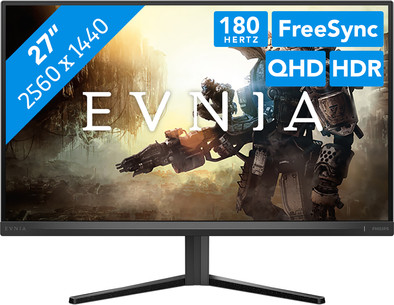
Philips 27M2N3500NL/00
Never available again
View alternatives in the sidebar
View alternatives in the sidebar
With Coolblue Extended Warranty, you are protected against costs due to quality defects of your monitor for the next 5 years. During the entire term, we will reimburse up to the original purchase price. You can easily add the Extended Warranty in your shopping cart.
€ 13,99
one-timeAdd your monitor to your shopping cart. In the next step, you can add the Extended Warranty. You can exchange or return your purchase for free within 30 days.
Product number | 950449 | |
|---|---|---|
Manufacturer code | 27M2N3500NL/00 | |
Brand | Philips | |
Warranty | 3 years | |
Processing of your defect | Via Coolblue |
Screen size | 27 inches | |
|---|---|---|
Recommended display resolution | 2560x1440 | |
Sharpness | Quad HD (1440p) | |
Aspect ratio | Standard (16:9) | |
Refresh rate | 180 Hz | |
Response time | 1 ms | |
Panel type | VA panel | |
Brightness | 300 cd/m2 | |
Local dimming | ||
HDR support | ||
Contrast ratio | 5000 | |
Touchscreen | ||
Type of HDR | HDR10 | |
Screen reflection | Anti-glare | |
Blue light filter | ||
Flicker-free technology | ||
Color space | sRGB | |
sRGB color coverage percentage | 127 % | |
Color depth | 17 million colors (8-bit) | |
Adaptive Sync | ||
Type of adaptive sync | FreeSync | |
Resolution width | 2560 pixels | |
Resolution height | 1440 pixels | |
Anti-reflection type | Matte | |
Horizontal viewing angle | 178 ° |
Height | 42 cm | |
|---|---|---|
Width | 69 cm | |
Depth | 14,1 cm | |
Weight | 3,7 kg | |
Color | Black | |
Including stand | ||
Material | Metal, Plastic | |
Cable management | ||
Appearance | Gaming | |
Curved |
Number of HDMI connectors | 2 | |
|---|---|---|
Number of Female HDMI type A 2.0 ports | 2 | |
Number of headphone jacks | 1 | |
Type of headphone connection | 3.5mm (TRS) | |
Number of Female Standard DisplayPort 1.4 ports | 1 | |
Number of female 3.5mm TRS Audio Jack ports | 1 | |
Suitable for daisy chaining | ||
USB-C dock |
Included by default | DisplayPort cable, HDMI cable | |
|---|---|---|
Not included by default | USB-C cable |
Adjustable in height | ||
|---|---|---|
Tiltable | ||
Pivotable stand | ||
Pivot function | ||
VESA mount option | ||
VESA mount | 100x100mm |
Energy label | E | |
|---|---|---|
Energy consumption standby | 0,5 W | |
Energy consumption active | 21,6 W | |
Energy consumption per 1000h | 21 kWh | |
Annual energy consumption | 30,66 kWh | |
Annual energy costs | 12,26 euros |
Built-in speakers | ||
|---|---|---|
Webcam | ||
Split screen | ||
Kensington lock |
Recommended for use | Gaming, Image editing and graphic design, Internet, email, and text processing, Watching movies in Full HD |
|---|
anything for a smile
Our digital expert will help you, but it can sometimes make mistakes, like humans do.
According to our monitor expert
Sharp image: you can clearly see small details on the screen thanks to the Quad HD resolution.
Play smoothly: you can see fast action smoothly on screen thanks to the 180Hz refresh rate.
Better overview: you can see more of the playing field thanks to the 27-inch screen.
DisplayPort required: you'll need a DisplayPort cable for 180 hertz, because you can't get that refresh rate via HDMI.
Less immersive: your gameplay is less immersive without a curved screen.
After some research I ended up with this monitor. I was hesitant to buy a VA panel because they often suffer from "black smearing". After connecting and setting up the monitor properly I was very surprised to see that this monitor does not suffer from this at all.
Long story short:
If you are looking for a monitor where the images are colorful and deep, look no further. Gaming and watching movies/series is just as enjoyable as when I watch it on my OLED TV, and that says a lot about this monitor.
Tip for those who want to buy it:
Set Smart MBR to around 5-10 in the monitor menu and leave SmartResponse off, this way you will not suffer from smearing/ghosting.
Gunnar
22 February 2025
Automatically translated from Nederlands
Very nice monitor, great to use with our media player and external speakers. Excellent value for money.
Steef (omgeving Uitgeest)
25 October 2025
Automatically translated from Nederlands
No nonsense, does exactly what it's supposed to do, top quality.
Richard
7 July 2026
Automatically translated from Nederlands

