LG UltraGear OLED 45GS95QE-B
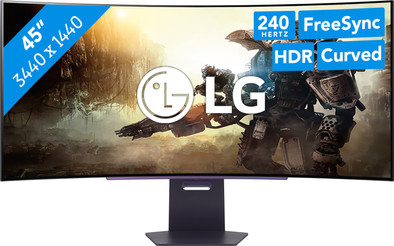
Never available again
View alternatives in the sidebar
View alternatives in the sidebar
Product number | 950461 | |
|---|---|---|
Manufacturer code | 45GS95QE-B.AEU | |
Brand | LG | |
Warranty | 2 years | |
Processing of your defect | Via Coolblue |
Screen size | 44,5 inches | |
|---|---|---|
Recommended display resolution | 3440x1440 | |
Sharpness | Quad HD (1440p) | |
Aspect ratio | Ultrawide (21:9) | |
Refresh rate | 240 Hz | |
Response time | 0,03 ms | |
Panel type | OLED | |
Brightness | 275 cd/m2 | |
Local dimming | ||
HDR support | ||
Contrast ratio | 1500000 | |
Touchscreen | ||
Type of HDR | DisplayHDR 400 True Black, HDR10 | |
Screen reflection | Anti-glare | |
Blue light filter | ||
Flicker-free technology | ||
Color space | DCI-P3 | |
Color depth | 1 billion colors (10-bit) | |
Adaptive Sync | ||
Type of adaptive sync | FreeSync, FreeSync 2, FreeSync Premium, Freesync Premium Pro, G-Sync, G-Sync Compatible, G-Sync Ultimate | |
Resolution width | 3440 pixels | |
Resolution height | 1440 pixels | |
Anti-reflection type | Anti glare | |
Horizontal viewing angle | 178 ° |
Height | 65,7 cm | |
|---|---|---|
Width | 99,2 cm | |
Depth | 33,5 cm | |
Weight | 8,9 kg | |
Color | Gray | |
Including stand | ||
Material | Plastic | |
Cable management | ||
Appearance | Gaming | |
Curved | ||
Screen curve | 800 R |
Number of HDMI connectors | 2 | |
|---|---|---|
Number of Female HDMI type A 2.0a port | 2 | |
Number of headphone jacks | 1 | |
Type of headphone connection | 3.5mm (TRS) | |
Number of female standard USB-A ports | 2 | |
Female standard USB-A port version | 3.0 | |
Number of female 3.5mm TRS Audio Jack ports | 1 | |
Number of female standard USB-B (3.0 form) ports | 1 | |
Type of USB port | Standard USB-A, Standard USB-B (3.0 form) | |
Number of USB ports | 3 | |
Suitable for daisy chaining | ||
Type of USB cable included | USB-A to USB-B | |
USB-C dock |
Included by default | DisplayPort cable, HDMI cable, USB cable | |
|---|---|---|
Not included by default | USB-C cable |
Adjustable in height | ||
|---|---|---|
Tiltable | ||
Pivotable stand | ||
Pivot function | ||
VESA mount option | ||
VESA mount | 100x100mm |
Energy label | F | |
|---|---|---|
Energy consumption standby | 0,5 W | |
Energy consumption active | 57,5 W | |
Energy consumption per 1000h | 46 kWh | |
Annual energy consumption | 67,16 kWh | |
Annual energy costs | 26,86 euros |
Built-in speakers | ||
|---|---|---|
Webcam | ||
Split screen | ||
Kensington lock |
Recommended for use | Gaming, Image editing and graphic design, Internet, email, and text processing, Photo editing, Video editing, Watching movies in Full HD |
|---|
anything for a smile
Sharpness | Quad HD (1440p) | |
|---|---|---|
Curved | ||
Aspect ratio | Ultrawide (21:9) | |
Refresh rate | 240 Hz | |
Response time | 0,03 ms | |
Panel type | OLED | |
Color depth | 1 billion colors (10-bit) | |
Built-in speakers |
According to our monitor expert
You can use multiple windows at the same time on the ultrawide screen.
On the QHD OLED screen, you can enjoy sharp images and realistic colors.
Thanks to the low response time and high refresh rate, movements and transitions look smooth.
This monitor is very large, so it takes up a lot of space on your desk.
With the LG UltraGear OLED 45GS95QE-B 45-inch QHD gaming monitor, you can play games with realistic colors and the sharpest details. Enjoy your favorite game even more because of the curved screen and the large screen size. That way, you can see even more of the world around you and you can use multiple windows at the same time. Colors also look more vibrant thanks to the OLED panel. The images on your screen look smooth. In addition, there's no screen tearing with the 240Hz refresh rate and 0.03ms response time. This gives you a head start against your opponents in a heavy battle. Use the FreeSync Premium or G-Sync support if you have an AMD or NVIDIA video card. This prevents screen tearing. Want to play on a console? Connect your PlayStation or Xbox Series X|S to one of the 2 HDMI ports. Adjust the height of the monitor or tilt it for a better sitting posture. This allows you to keep gaming without problems.
Note the maximum refresh rate via HDMI is 144Hz. For 240Hz gaming, you need to connect the monitor via DisplayPort.
Yes, fantastic monitor that is extremely suitable for both programming and gaming.
Jody
3 November 2025
Automatically translated from Nederlands
I've been searching for a really good ultrawide monitor for a long time. I always had an eye for LG ultrawide monitors, but the pixel density and resolution issues with previous models held me back. This monitor has definitely taken a step up in terms of pixel density (50% more than previous models) and 5120 x 2160 resolution. 45 inches is really quite large, so make sure your desk has enough space. HDR color reproduction is truly excellent! SDR isn't too bad in terms of color; some colors weren't quite as accurate, but using the Nvidia app to convert SDR videos to HDR content, the colors are reasonably accurate. The dual mode has eight different modes you can set, including the lower resolution (2560 x 1080) for gaming at 330 Hz. For 5120 x 2160 gaming at 165 Hz, you'll need a powerful graphics card with at least 16 GB of VRAM. If you have a slightly lower resolution, you can game at 3440 x 1440, but the 165Hz setting remains the same.
I also noticed that both sides of the monitor dim slightly more than the center, especially the HUD layout. This isn't a bug, but normal. It's not excessive, as most of the screen is visible from the center. It does brighten up at certain times. This is my first OLED monitor, so I'm not sure if others have the same issue, but after extended use, the monitor automatically performs an image cleanup to prevent burn-in when the PC shuts down.
Xavier
8 September 2025
Automatically translated from Nederlands
The screen is fantastic. Works wonderfully. It is pricey for a 5K2K screen, but that is mainly because it is a size larger (45 instead of 40 inches). It was supposed to be delivered the next day, and after a few phone calls, it arrived after six days.
Pieter
6 June 2026
Automatically translated from Nederlands

