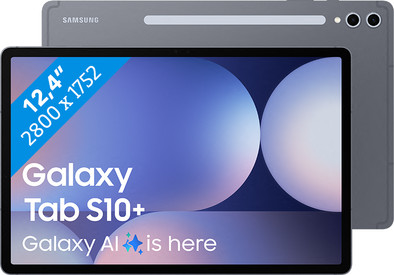
Samsung Galaxy Tab S10 Plus 12.4 inches 512GB WiFi + 5G Gray
Never available again
View alternatives in the sidebar
Choose the better tablet with a larger screen
Samsung Tab S10 Ultra
Better model
View alternatives in the sidebar
Better model
Product number | 954267 | |
|---|---|---|
Manufacturer code | SM-X826BZAPEUB | |
Brand | Samsung | |
Warranty | 2 years | |
Processing of your defect | Via Coolblue |
Tablet size | Large | |
|---|---|---|
Depth | 0,56 cm | |
Width | 28,54 cm | |
Height | 18,54 cm | |
Color | Gray | |
Material | Metal |
Child mode available | ||
|---|---|---|
Children's tablet | ||
Recommended for use | Business use, Movies, series, and gaming, School and business | |
Samsung Enterprise Edition |
Screen quality | Excellent | |
|---|---|---|
Screen size | 12,4 inches | |
Screen-to-body ratio | 85,65 % | |
Sharpness | Wide QXGA+ | |
Resolution height | 1752 pixels | |
Resolution width | 2800 pixels | |
Pixel density | 266 ppi | |
Brightness | 420 cd/m2 | |
HDR support | ||
Type of HDR | HDR10+ | |
Scratch resistant | ||
Panel type | AMOLED | |
Horizontal aspect ratio | 16 | |
Vertical aspect ratio | 10 | |
Refresh rate | 120 Hz |
Built-in WiFi | ||
|---|---|---|
WiFi standards | Wireless A (WiFi 2), Wireless AC (WiFi 5), Wireless AX (WiFi 6), Wireless AXE (WiFi 6E), Wireless B (WiFi 1), Wireless G (WiFi 3), Wireless N (WiFi 4) | |
Internet connection options | 5G and WiFi | |
SIM card slot | ||
SIM card slot type | Nano SIM | |
Bluetooth | ||
Bluetooth version | 5.3 | |
Headphone jack | ||
USB port | ||
Type of USB port | USB-C | |
Lightning connector | ||
Specific Absorption Rate (SAR) category | To be announced |
Year introduced | 2024 | |
|---|---|---|
Introduction month | September | |
Access to Google Play Store | ||
Operating system | Android | |
Android version when introduced | Android 14 | |
Update to Android version possible | Update not possible yet | |
Latest Android version | ||
Expected number of remaining Android updates | 7 | |
Expected frequency security updates | Every month | |
Expected date of last security update | September 2031 | |
Assessment remaining security updates | Excellent | |
Review update policy | Very good |
Total storage capacity | 512 GB | |
|---|---|---|
Memory card reader | ||
Memory card | MicroSD | |
Expandable storage capacity up to | 1536 GB | |
Internal RAM | 12 GB |
Speed class | Excellent | |
|---|---|---|
Processor | MediaTek MT6989 | |
Processor cores | Octa-Core (8) | |
Clock speed | 2,8 GHz | |
Turbo speed | 3,4 GHz |
Autofocus | ||
|---|---|---|
Front Camera | ||
Number of megapixels front camera | 12 MP | |
Second rear camera | ||
Rear camera 2 lens type | Wide-angle | |
Number of megapixels second rear camera | 8 MP | |
Fixed aperture second rear camera | 2,2 f/ |
Battery/battery capacity | 10,09 Ah | |
|---|---|---|
Suitable for fast charging | ||
Suitable for fast charging type | Samsung Adaptive Fast Charge | |
Power wired fast charging | 45 W |
Built-in speakers | ||
|---|---|---|
Sound reproduction | Stereo | |
Number of speakers | 4 |
Accelerometer | ||
|---|---|---|
GPS sensor | ||
Light sensor | ||
Fingerprint identity sensor | ||
Facial recognition |
Water-resistant | ||
|---|---|---|
IP certification | IP68 | |
Shockproof |
anything for a smile
Recommended for use | Business use, Movies, series, and gaming, School and business | |
|---|---|---|
Tablet size | Large | |
Speed class | Excellent | |
Screen quality | Excellent | |
Total storage capacity | 512 GB | |
Internet connection options | 5G and WiFi | |
Screen size | 12,4 inches | |
Operating system | Android |
According to our tablet expert
The tablet can handle the most demanding tasks without problems, like 3D games and photo editing.
On this large tablet, you can work comfortably and easily open multiple apps at the same time.
You can easily edit photos or quickly summarize your written text with Galaxy AI.
This large tablet is not as easy to take with you on the go as a medium-sized tablet.
To stay online everywhere via 5G, you need a SIM card or eSIM with a mobile data plan.
Until recently, I used a Samsung Galaxy Tab A, which still worked fine, but often crashed. After some research on Coolblue, I discovered that the Tab S series is considerably faster. Using the filters, I ended up with the Tab S10+. What a great purchase! This tablet never crashes, apps open immediately, and booting is lightning fast.
A nice extra is the included S Pen. Although I don't necessarily need it, it is a nice addition. The pen writes just like on paper and has smart functions, such as AI that converts handwritten text into typed text. You can also make sketches and organize notes. Handy, but for me not the main reason for this purchase.
I recommend this tablet to everyone. If you have any doubts: just do it! The quality is impressive, and I really can't think of anything negative. For extra safety, I did buy a screen protector, given the higher price range. Prevention is better than cure!
Another handy feature is the option to connect an external screen via USB-C. This is ideal for presentations, especially since I often have meetings where a wireless screen option is not always available. With a USB-C to HDMI adapter I can easily share my screen.
At the next meeting I will leave my laptop at home and try it with just the tablet. Exciting, but I have every confidence in it!
Milan
14 December 2024
Automatically translated from Nederlands
I am very satisfied with the s10 plus tablet. One reason why I went for Samsung is because I am deeply intertwined with the Samsung ecosystem and it is therefore easy for me in terms of connectivity. So I am already familiar with Samsung and all the functionalities. Software-wise there was nothing new for me. The hardware is where the difference is made. The large screen, the stylus pen and the very impressive processor contribute to the predominantly positive experience. Although the reason for purchase is work-related, I also catch myself gaming a lot on the tablet because it is so powerful. This also includes the occasional film or series and I am truly impressed. Bright but also deep colours that you can clearly distinguish from each other. I was not entirely unfamiliar with the stylus pen but on a business level it is still a big improvement. Quick sketches are much better this way.
Alexander
25 February 2025
Automatically translated from Nederlands
Use is mainly business. I am often busy with apps such as Deepseek OpenAI etc. and that works very well. The supplied pen has instant input and is nice to use. The contrast with my old tablet is great when it comes to speed, image quality but also the refresh rate. The battery is good but could be better, this is easily solved by lowering the brightness a bit. This may not be an option if you are working with images but otherwise it is fine. The refresh rate of 120hz is especially useful for sports matches. It is a bit smoother when I compare it to my TV for example. A happy buyer.
Dennis
16 February 2025
Automatically translated from Nederlands